
One Platform, All AI Models for Your Organization
Enter Ai is a multi-tenant dashboard that brings together smart chat, document library, user and team management in a secure environment — without locking you into a specific AI provider.
- Dedicated deployment for each organization
- Full data encryption
- No code needed to add new models
Everything an organization needs for secure AI usage
From smart chat to access management, all in a single dashboard aligned with your organizational structure.
Multi-Model Architecture
Connect to OpenAI, Claude, Gemini, DeepSeek and future models through the admin panel, without writing a single line of code.
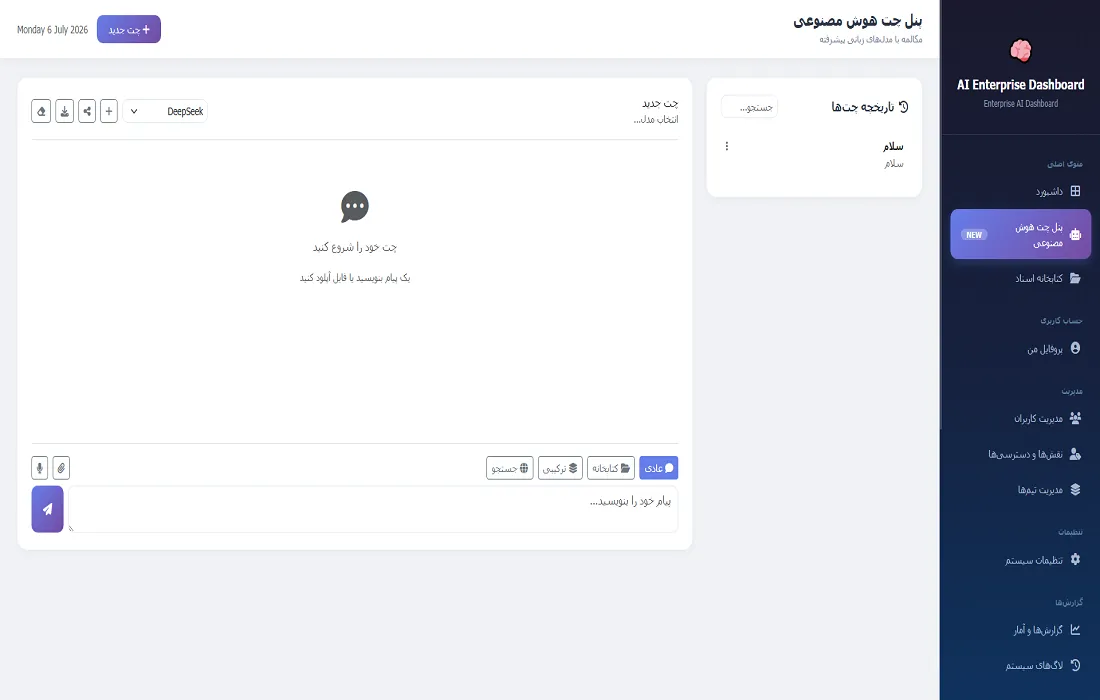
Enterprise Chat Panel
ChatGPT-like experience with text, file, image and voice messages, plus "Library Only" and "Internet Search" modes.
Users, Roles & Teams
Hierarchical access structure from main admin to employees, with dynamic teams and dedicated supervisors.
Smart Document Library
Model responses based on internal documents with direct source references, with separate access for each team.
Security at All Layers
Passwordless login, triple captcha, auto-lock after failed attempts, and full API key encryption.
Reports & Quotas
Token usage monitoring per user and team, fair usage quotas or exceptions for special users.
Never get locked into a single AI provider
Enter Ai's Adapter layer transforms each model's request/response structure into a unified internal format — adding the next model is a decision, not a development project.
Connect with a few clicks
Enter the model name, Endpoint URL and API key in the admin panel; no coding required for compatible models.
Automatic Standardization
Each model through its own adapter provides the exact same conversation, file upload and response experience for users.
Free Choice for Each Team
Admins can determine which team has access to which model, based on cost, accuracy or project requirements.
Conversations that know your company's identity
Company profile, communication tone and each employee's role are automatically injected into model responses — the tone for a sales manager differs from that of a researcher.
- Send text, files, images and voice messages
- Two response modes: Library Only or Internet Search
- Share conversations with team or refer to supervisor
Align permissions exactly with your organizational chart
Each supervisor only has management access to their own team members and can adjust member permissions within the framework set by the main admin.
- Atomic permissions like view, edit or full management
- Each user can be member of multiple teams with one primary team
- Temporary access with expiration date
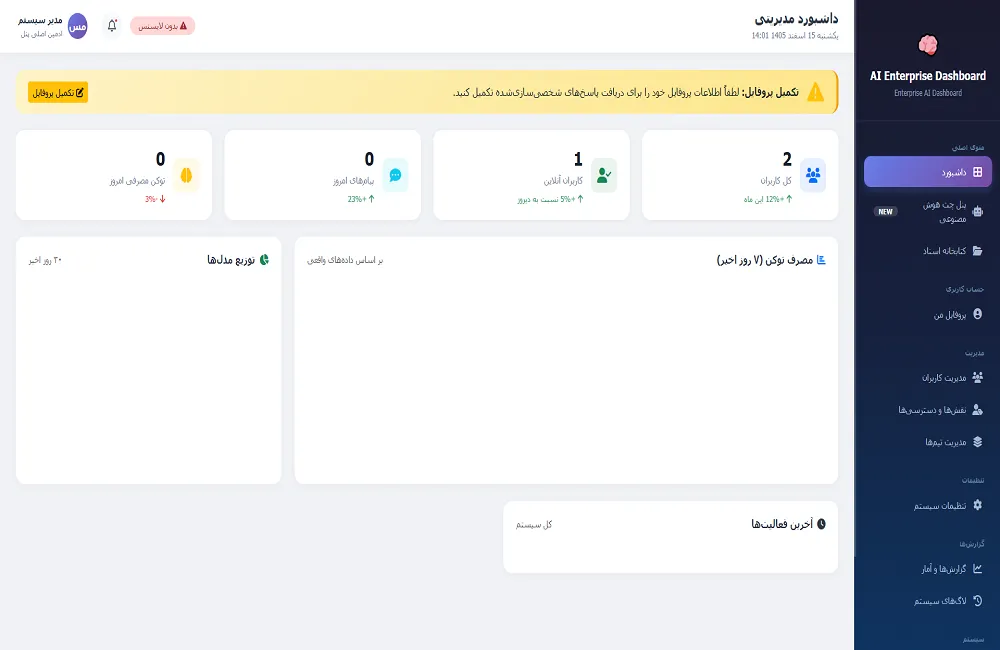
See your organization's AI usage transparently
Daily, weekly and monthly charts of token usage, most used models and team performance comparison — all in one view.
- Filter by user, team and time period
- Alert before reaching token quota limit
- Complete security event logs and login/out records
Enter Ai Blog
Latest articles and news from the world of enterprise AI

Security designed for sensitive organizational data
From API key encryption to Brute-Force protection, every layer is built for demanding enterprise environments.
Passwordless Login
Password reset only by admin or SMS one-time code, without vulnerable public forms.
Triple Captcha
Support for Cloudflare Turnstile, reCAPTCHA and custom captcha to prevent bots.
Complete Event Logging
Record every login, permission change and suspicious event with IP and exact time.
API Key Encryption
Store AI model API keys encrypted and securely retrievable.
A plan for your organization's size
Each plan is deployed as a completely separate instance for your organization.
Enterprise
- All AI models + Internet search
- Document library with RAG
- Unlimited teams and full reporting
Large Enterprise
- All Enterprise plan features
- Dedicated support and SLA
- Custom model options
Answers to Common Questions
Each organization can determine which model is used for which data type and use "Library Only" mode for responses based solely on internal documents.
For compatible models, just enter the model name, Endpoint and API key in the admin panel — no code development required.
Yes, quotas can be defined at user, team or organization level, with exceptions for special users.
Yes, each organization receives a completely separate instance that can be deployed on your dedicated server or our recommended infrastructure.
Ready to see Enter Ai in action?
Book a 30-minute demo session to see the dashboard with your organization's actual data.